
The Ansible Network as Code (NaC) collection gives us a declarative way to configure a VXLAN EVPN fabric managed by Nexus Dashboard. Instead of writing custom playbook tasks for each VRF, Network, switch attachment, or policy, we describe the intended fabric state in YAML data model files and run the NaC roles to validate, create, and deploy that intent.
Ansible Content Collections are a packaging format for bundling and distributing Ansible plugins, roles, modules,
and related automation content. In this lab, the collection we work with directly is
cisco.nac_dc_vxlan.
The NDFC Ansible Collection is still a required dependency because NaC uses the supported ND connection and module layer under the hood. The difference is that our lab work will focus on the NaC data model and NaC roles instead of calling individual NDFC Ansible Collection modules from our own role.
A typical requirements file for this lab looks like this:
---
collections:
  - name: cisco.nac_dc_vxlan
  - name: cisco.dcnm
  - name: ansible.netcommon
  - name: ansible.posix
  - name: ansible.utils
  - name: community.general
These collections are installed with ansible-galaxy collection install.
ansible-galaxy collection install -r requirements.yaml
The main playbook stays small and reusable. The roles read the files under host_vars/<fabric-name>,
merge the data model, validate it, and then push the requested intent to ND.
---
- name: Build VXLAN EVPN fabric with NaC
  hosts: all
  any_errors_fatal: true
  gather_facts: false
  roles:
    # Prepare service model for all subsequent roles
    # Note - The validate role is run automatically as a prerequisite to the create, deploy, and remove roles.
    #
    # - role: cisco.nac_dc_vxlan.validate
    # -----------------------
    # DataCenter Roles
    #   Role: cisco.nac_dc_vxlan.dtc manages direct to controller ND workflows
    #
    - role: cisco.nac_dc_vxlan.dtc.create
      tags:
        - role_create
    - role: cisco.nac_dc_vxlan.dtc.deploy
      tags:
        - role_deploy
    - role: cisco.nac_dc_vxlan.dtc.remove
      tags:
        - role_remove
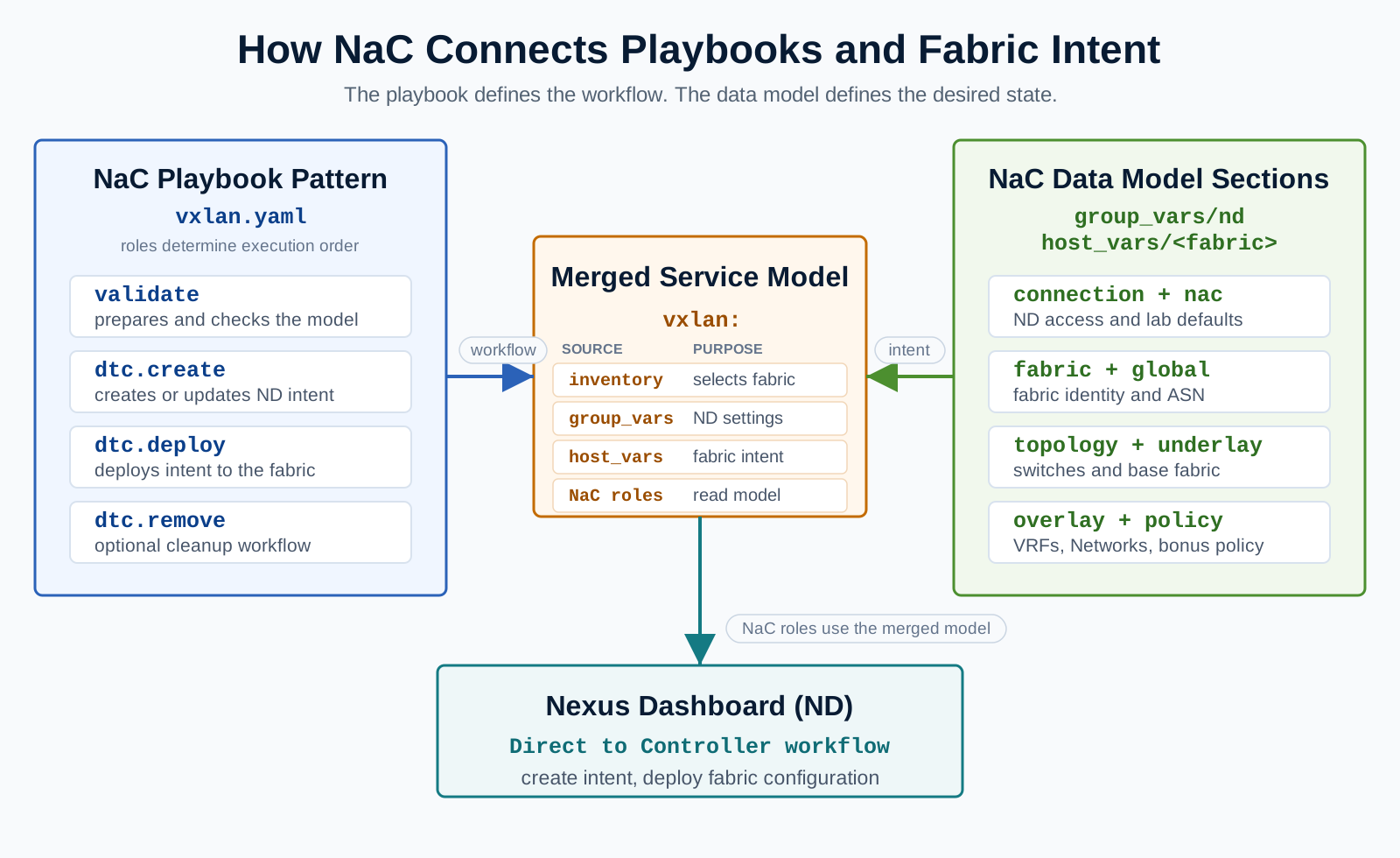
For the rest of this lab, the main artifact you edit is the NaC YAML data model. The NDFC Ansible Collection remains installed as a dependency, but the attendee workflow is model first: update intent, validate intent, deploy intent.
NaC stores fabric intent under the vxlan root key. The major sections include fabric metadata, global
settings, topology, underlay, overlay, overlay extensions, and policy. This lab primarily uses the
overlay section for VRFs and Networks, then the policy section in the bonus task.
---
vxlan:
  fabric:
    name: fabric-stage
    type: VXLAN_EVPN
  global:
    ibgp:
      bgp_asn: "65058"
  overlay:
    vrfs:
      - name: vrf_devnet
        vrf_id: 150001
        vlan_id: 2000
        vrf_attach_group: all_leaf
    networks:
      - name: network_devnet1
        vrf_name: vrf_devnet
        net_id: 130001
        vlan_id: 2301
        gw_ip_address: 10.10.10.1/24
        network_attach_group: esxi
The source and documentation for the NaC VXLAN collection are available from the following links: